Physical Address
304 North Cardinal St.
Dorchester Center, MA 02124
Physical Address
304 North Cardinal St.
Dorchester Center, MA 02124

Reminder emails help businesses maintain consistency with right-time email conversations, minimize missed actions, and carry a big responsibility in email marketing. However, most people don’t know how to send a reminder email that do not sound pushy or irritate readers. If you are one of them, don’t worry! We are here to guide you on how to write a reminder email, what to include, and ready-to-use templates that you can simply copy for real use cases like meetings, payments, offers, and more.
When you choose a weak message, the reader ignores it, whereas when you rely on a too-strong message, it can annoy the reader as well. The real challenge in a reminder email is settling on the middle ground where you do not compromise on clarity and politeness. So, let’s deal with this challenge.
Before learning how to send a reminder email, it is better to know what makes a reminder email work in the first place.
So, basically, a reminder email is not just a follow-up message. It is a structured nudge that brings attention back to your customers to something important through email.
Your strong reminder email usually includes:
Your reminder email should have a clear and to-the-point subject line. It should quickly tell the reader what the email is about. For example:
Make sure your reminder email has a short line explaining what you are referring to. Do not write a long story. Just enough to recall.
Your reminder should have a clear direction towards the next action that you are expecting from the readers. It could be confirmation, payment, reply, or registration, anything.
You can not skip any important detail in your reminder email. In mentioning the deadline, it can help create clarity without sounding forceful.
The tone matters more than anything else in a reminder email. It should stay respectful and neutral.
Besides this, your reminder emails should include the complete details, forms, or links if there are any related to the event. Your reader should not search for information elsewhere.
A reminder email example that works well always follows this structure. Simplicity is what makes it effective.
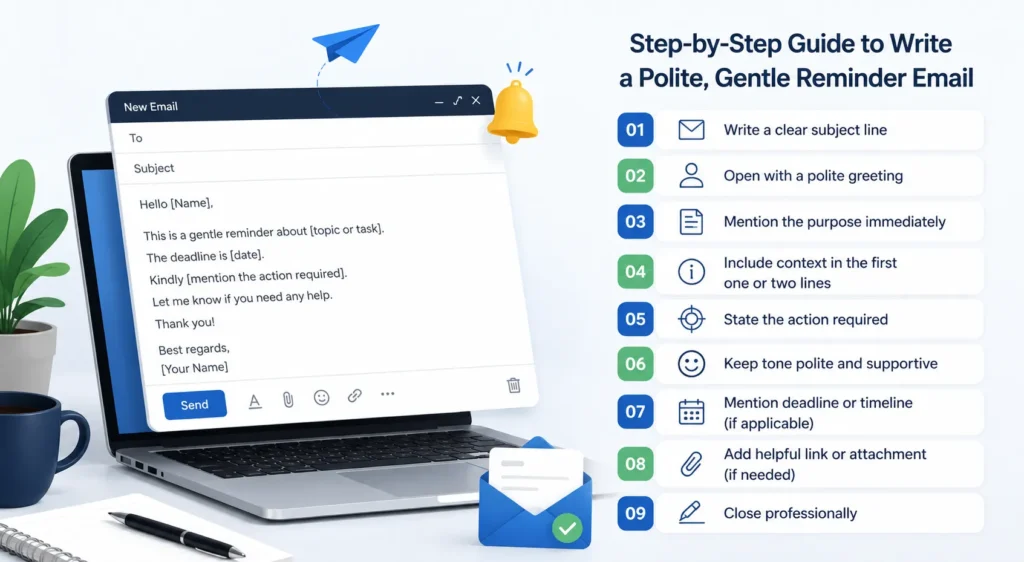
Understanding how to write a reminder email becomes easier when broken into steps. This process works for almost every situation, from business communication to marketing follow-ups.
Your subject line should not confuse your reader. So, keep it direct and clear.
Reminder Subject Line Examples:
You should not use heavy formal language in the opening of a reminder email. Always keep it simple and respectful so that the reader stops to read forward.
Example:
“Hello John,” or “Hi Team,” works perfectly.
Do not stick your reader into storytelling. Quickly remind the reader of the main point.
Example:
“This is a gentle reminder about the invoice shared on 10th May.”
Your starting line should briefly mention the original message or event. The reader will remember it then.
Example:
“The payment for the monthly subscription is due on 28th May.”
Your reader should know exactly what action we are expecting from him/her instantly through your reminder email.
Example:
“Kindly complete the payment before the due date.”
Write a reminder email respectfully and politely. Do not write in a way that sounds demanding.
Your email should look professional at the same time. So end your email with gratitude or availability for help.
Example:
“Thank you for your time. Let me know if you need any support.”
When you follow this simple structure, it makes your reminder email effective and to the point. This format is the base for most email marketing templates, especially in follow-ups and engagement campaigns.
Below are practical templates you can directly use. These are suitable reminder email example for business, marketing, HR, and client communication.
Subject: Reminder: Upcoming meeting scheduled
Hello [Name],
This is a gentle reminder about our meeting scheduled on [date] at [time].
We will discuss [topic]. Please join using the link shared earlier.
Looking forward to your presence.
Thank you.
Subject: Gentle reminder: Invoice payment pending
Hi [Name],
This is a reminder regarding the invoice [number] due on [date].
Kindly complete the payment before the deadline to avoid delays.
Let me know if you need any details.
Thank you.
Subject: Reminder: Invitation for upcoming event
Hello [Name],
We are reminding you about the event scheduled on [date].
We would be glad to have your presence. Please confirm your participation.
Warm regards.
NOTE: This template works perfectly for invitation email templates.
Subject: Following up on your interest
Hi [Name],
Just a quick reminder about the details we shared regarding [product/service].
Let us know if you have any questions or would like more information.
Happy to help.
Subject: Reminder: Subscription renewal due soon
Hello [Name],
Your subscription will expire on [date].
To continue uninterrupted service, please renew before the due date.
Thank you for staying with us.
Subject: You left something behind
Hi [Name],
This is a reminder about the items left in your cart.
Your selected products are still available. Complete your purchase before they run out.
NOTE: (This is commonly used in email marketing strategy for conversions.)
Subject: Reminder: Submission deadline approaching
Hello [Name],
This is a gentle reminder that the submission deadline is [date].
Please share your work before the deadline to avoid delays.
Thank you.
Subject: Reminder: We value your feedback
Hi [Name],
We are following up to request your feedback on [service/product].
Your input helps improve future experiences.
Looking forward to your response.
Subject: Last reminder: Limited-time offer ending soon
Hello [Name],
This is a reminder that your offer expires on [date].
Grab the opportunity before it ends.
NOTE: (This is a strong use case of offer email templates in marketing campaigns.)
Subject: Quick reminder
Hi [Name],
Just a reminder about our previous conversation regarding [topic].
Let me know if there is any update.
Thank you.
You can easily adjust these reminder email templates for different industries and communication needs.
Take a look at the very common issues that most marketers struggle with while writing a reminder email in email marketing. Avoid these in yours:
When you know these are the mistakes, you skip these and make your reminder email more impressive. It enhances your email marketing strategy and increases response rates.
Do you actually think that writing a reminder email is about pushing someone to act? No. Not at all. But it is about bringing attention back in a simple, respectful way without sounding demanding. It is just a reminder to inform the user of something. Once you understand how to write a reminder email, the process becomes easier.
Whether you are sending a meeting reminder, payment alert, or marketing follow-up, a clear format always works better than complicated messaging. And so you can make the process simple with TrueSend’s ready-to-use email marketing templates, notification email templates, or invitation email templates. It saves time and also improves consistency across communication.
If you are a business that handles large email volumes, then tools like TrueSend are the perfect solution for you, as they simplify the process. TrueSend helps in automating reminders, managing sequences, and maintaining clean delivery without manual effort. What you will enjoy is less time writing repetitive messages and more focus on actual strategy and growth.
When should I send a reminder email?
You should send a reminder email within a reasonable gap. It can be 24-72 hours for regular emails or when the deadline of the event is approaching. However, the right time depends on what action you are expecting from your reader instantly.
How many reminder emails are appropriate to send?
Make sure you do not send too many reminder emails, as it can overwhelm your reader and affect the engagement. You can send 1–3 reminder emails in your email campaign.
Do reminder emails increase response or conversion rate?
Yes, your reminder emails bring attention back to users to the missed or pending actions. So, it actually improves response rates and conversions. You can give better results in sales, events, and abandoned cart situations with reminder emails.
Can I automate reminder emails?
Absolutely, you can automate your reminder emails with TrueSend using email marketing tools like Email Automation & Workflow. Now save your time and keep communication consistent.
What are common mistakes to avoid in reminder emails?
Here are some common mistakes that most marketers make in sending reminder emails. Take a look to avoid them:
Always keep the message short, clear, and focused on one action.